
Device States
The States page on PDK.io allows you to view and control the states of various connected doors and devices and configure a floor layout of devices for easy management and monitoring.
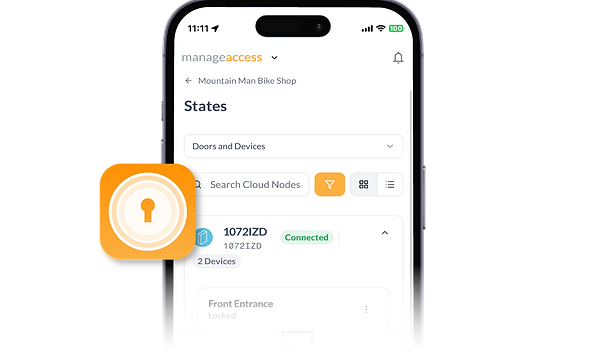
Clear Visibility into Device Activity
Customizable Filters
Select the exact device information you want to see.
Real-Time Updates
Instantly see the current status of each device.
Map View
View the status of your devices in the context of a floor plan.
Learn more about Device States:

A brief instructional video walking you through how to monitor the state of a Device through the PDK Access app.

A quick introduction to monitoring Device States in PDK.io.

An article highlighting some key features that all PDK users should be aware of, including Device States.

This article from PDK’s Online Help Center outlines how you can monitor your devices through the States page.
Frequently Asked Questions
What are Device States in PDK.io?
Device States refers to the status of a device in PDK.io, which could be open, closed, propped, locked, and more.
What is the Stages page in PDK.io?
The States page in PDK.io is where users can actively monitor the status of their doors and devices.
Do Device States help with troubleshooting?
Yes, monitoring Device States can help you quickly notice and address any issues.


PDK access app
Take a step towards the future of access control


Anytime. Anywhere. Any Device.
Other PDK Products


